Product

Sales tax follows the job site. The rates are yours.

Every job site picks its own tax group, built from the rates you enter. Each line is taxed the way you say, a certificate zeroes what it covers, and the invoice keeps its tax for good. Pavr figures the tax with your numbers and gives no tax advice.

Where it's taxed

The lot picks the rate, not the billing address.

A property manager in Dallas with lots in Dallas, Plano and Frisco gets three tax groups, one per lot. You add the authorities you collect for and their rates, stack them into a group for each place you work, and the job site picks the group. When a rate changes you add the new one with the day it starts; the old one is never edited, so last spring's invoice still shows the rate it went out with.

  • Pavr ships no tax rates. The rates on every invoice are the ones you typed in, and an owner accepts that before anything is taxed.
  • A taxable line with no tax group won't finalize. Pavr won't guess a rate, and it won't quietly charge zero.

What an owner accepts before anything is taxed

You're responsible for your sales tax. Set up every rate and tax group you charge, keep them current, decide which work is taxable, collect exemption certificates, and register and file in every state where you work. Pavr calculates with what you enter and doesn't give tax advice.

It stays at the top of every sales tax page, with who accepted it and when.

What's taxed

Each line is taxed one of four ways. You pick.

Every service in your service library carries how it's taxed, and any single line can differ from its service. In most states a contractor pays tax on materials and charges none on lump-sum paving, so that's where every new service starts. Where a state taxes the work, or you bill materials separately, or a gross receipts tax is yours to pass on, the line says so and the invoice follows.

  • Deposits, late fees and retainage releases are never taxed, whatever a line says
  • A certificate is the only exemption: the customer's paper, its states and its expiry, on the customer or on one job. An expired one doesn't zero the tax; Pavr charges it and warns you.

How estimating works

Four ways to tax a line

Set once on the service, changed on any line.

The four tax treatments a line can carry
Not taxed you pay tax on your materials and charge none Most lump-sum work
Taxed on the full price the state taxes the work itself Whole line
Taxed on materials only you bill materials and labor split out Materials
Gross receipts tax, passed on the contractor's own tax, passed on as its own line Own line
Where every new service starts Nothing is taxed until you say so Not taxed

Into your books

Checked before it goes to QuickBooks, and checked again when it comes back.

Each tax group picks the QuickBooks tax code it goes to your books with: you make one combined rate in QuickBooks for each group and pick it in Pavr. Before an invoice with tax goes over, Pavr checks that the group has a code QuickBooks still has, that the code's rate matches, that the job site has a full street address, that both sides agree on whether the customer is exempt, and that the lines' tax adds up to the invoice's. Each problem that holds the invoice comes with the link that fixes it.

  • Pavr sends the invoice with its tax and its code, reads back what QuickBooks kept, and flags the invoice in Settings if the total, the tax or the code came back different
  • If QuickBooks swapped the code, Pavr says so: the total can still match while the tax is credited to the wrong agencies
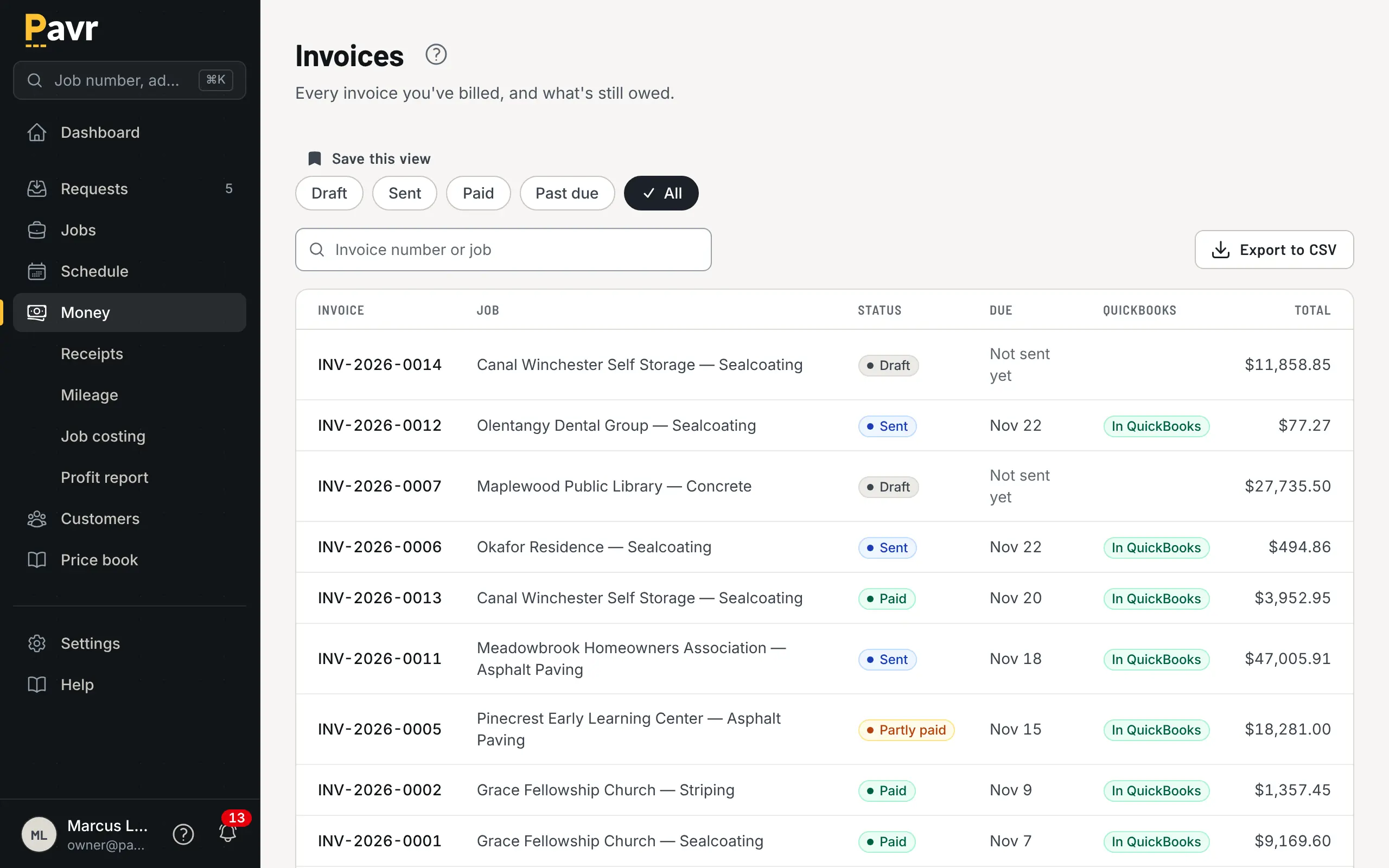
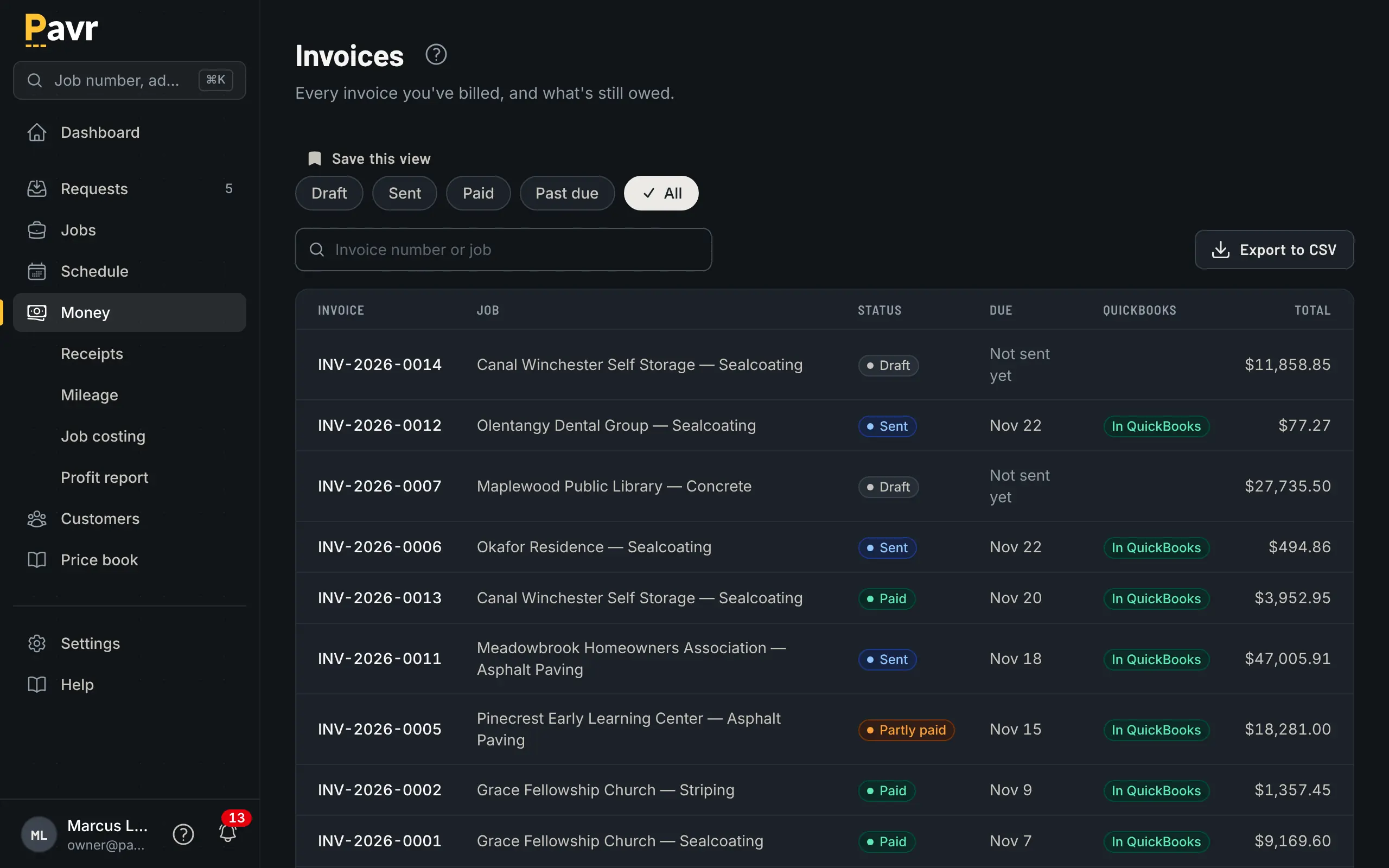
The invoice list with draft, sent, paid and past-due invoices, each showing whether it's in QuickBooks, and its total.

When you file

The numbers a return asks for, by state and by authority.

Record where you're registered, and the reports read the way a return asks: a liability report by state and authority, issued and collected side by side for cash-basis filers; a filing summary with one state's boxes for one period and your registration number beside them; and an itemized CSV, a row per invoice line and per credit, for your accountant or filing service. A void or a refund comes back out in the period it happens.

  • The tax you pay on material is a job cost, not a line on the customer's invoice. Each material can record the state you buy it in and whether you paid tax on it.
  • Pavr doesn't register you, doesn't file for you and doesn't remit anything. You copy the numbers onto the return.

How job costing works

The filing summary, one state, one period

What each box reads from.

What the filing summary shows for one state and one period
Gross sales every invoice issued for job sites in the state Issued invoices
Exempt sales a certificate zeroed Certificates
Gross receipts tax passed on the pass-through lines, shown on their own Own lines
Not taxable work the service or the line says isn't taxed Not-taxed lines
Taxed at each authority's rate, with the tax beside it Taxed lines
Tax by authority, with your registration number beside it Pavr doesn't file You do

Where the rates come from

Pavr ships no tax rates. You add the authorities you collect for, the state, the county, the city, a transit district, type each one's rate and the day it starts, and stack them into a tax group for each place you work. When a county adds a point, you add the new rate with its start date. The old one is never edited, so last spring's invoice still shows the rate it went out with.

The job site picks the group

A property manager in Dallas with lots in Dallas, Plano and Frisco gets three tax groups, one per lot. The billing address never decides the rate. When you set a job's address, Pavr checks the city, the ZIP and the county against your groups in that state and fills in the one that fits; if two fit equally, it asks. A taxable line with no group won't finalize. Pavr won't guess a rate, and it won't quietly charge zero.

Four ways to tax a line

Every service in your service library carries how it's taxed, and any single line can differ from its service: not taxed, where every new service starts, because in most states you pay the tax on your materials and charge none on lump-sum work; taxed on the full price; taxed on materials only; or a gross receipts tax passed on as its own line. Deposits, late fees and retainage releases are never taxed.

Customers who don't pay tax

A certificate is the only exemption. Add it to the customer with the reason, the number, the states it covers, the dates, and a photo or PDF of the paper, for all of the customer's jobs or for one. A certificate for Texas doesn't zero the tax on a job site in Oklahoma, and an expired one doesn't zero anything: Pavr charges the tax and warns you, so you can ask for a new one before the invoice goes.

Frozen on the invoice

Proposals never put tax in the total; the customer reads "Applicable sales tax will be added to your final invoice." When you finalize the invoice, Pavr copies the group, each rate, how each line is taxed and any certificate onto it, and a rate change next month never touches it. The customer sees one Sales tax line with the breakdown by authority under it, and a void reverses at the rates the invoice went out with.

Warnings, not advice

A warning never stops an invoice or changes a number. Pavr tells you when a job site is outside your home state or in a state you've entered no registration for, when a line is taxable though its service isn't, and when a certificate has expired or doesn't cover the job site's state. It names a state's own rule only where the rule is well known: New York, West Virginia, Texas, Washington, New Mexico, Hawaii, Arizona and Florida. A job anywhere else hasn't been cleared. It just isn't one Pavr says anything about.

Into your books

If you connect QuickBooks Online, each tax group picks the QuickBooks tax code it goes to your books with: you make one combined rate in QuickBooks for each group and pick it in Pavr. Before an invoice with tax goes over, Pavr checks that the code is still there at the same rate, that the job site has a street address, that both sides agree on whether the customer is exempt, and that the lines' tax adds up. Then it sends the invoice with its tax and its code, reads back what QuickBooks kept, and flags the invoice in Settings if the total, the tax or the code came back different. If QuickBooks swapped the code, Pavr says so, because the total can still match while the tax is credited to the wrong agencies. The other accounting software Pavr connects to gets the same care.

When you file

Record where you're registered, and the reports read the way a return asks: a liability report by state and authority, issued and collected side by side for cash-basis filers; a filing summary with one state's boxes for one period and your registration number beside them; and an itemized CSV, a row per invoice line, for your accountant or filing service. Each material in your service library can record the state you buy it in and whether you paid tax on it. Pavr doesn't register you, doesn't file for you and doesn't remit anything. You copy the numbers onto the return.

What you take on

Before anything is taxed, an owner accepts this, and it stays at the top of every sales tax page:

You're responsible for your sales tax. Set up every rate and tax group you charge, keep them current, decide which work is taxable, collect exemption certificates, and register and file in every state where you work. Pavr calculates with what you enter and doesn't give tax advice.

Not sure what's taxable on your work? Ask your accountant or your state's department of revenue. Pavr can carry the answer onto every invoice; it can't give it.

Put one real job through it.

Draw a lot you priced last month, price it with your own numbers, and see what it would have made. Fourteen days, no credit card.